top of page

Glucomood
A digital companion app.
August 2023- June 2024
This project was accepted at the HCI International 2024 Conference in the Student Design Category.
This project was part of my MFA thesis project which I defended on June 2024.
Project brief
Glucomood is a digital companion application designed for adolescents with type 1 diabetes (T1D), that offers them both management tools for their condition and support for the mental health challenges that arise from living with it. This app helps users navigate their health journey with confidence and encourages the adoption of healthy lifestyle habits.
What is Type 1 Diabetes?
Type 1 Diabetes (T1D) is an autoimmune condition where the pancreas produces little or no insulin, (a hormone essential for converting glucose into energy). Mainly diagnosed in children and young adults, T1D requires lifelong management, including regular blood sugar monitoring, insulin therapy, and dietary adjustments.
8.75
million people live with T1D around the world
1.52
million are less than 20 years old
A report from the International Diabetes Foundation in 2022
13·5-17·4
million increase is predicted for 2040
Gregory, G. A., Robinson, T. I., Linklater, S. E., Wang, F., Colagiuri, S., de Beaufort, C., ... & Ogle, G. D. (2022). Global incidence, prevalence, and mortality of type 1 diabetes in 2021 with projection to 2040: a modelling study. The lancet Diabetes & endocrinology, 10(10), 741-760.
Problem
Despite the availability of numerous digital tools for T1D management, there is a lack of resources addressing the overall well-being, especially the user's mental health and emotional needs.
Goals
Empower adolescents to manage their diabetes independently and confidently.
Offer age-appropriate educational resources to enhance T1D understanding.
Address both physical and mental health aspects for holistic care.
Target Audience
The target audience for Glucomood are adolescents between the ages of 10-19.
Adolescents face key challenges while living with T1D:
– Transition to Adulthood
– Peer Acceptance and Body Image Concerns
– The Stress of Daily Disease Management
– Hormonal Changes and Insulin Sensitivity

A diagnosis of type 1 diabetes at this age can place additional strain on a young person, at a time when their instincts and desires might direct them towards behaviors that are risk-taking in nature and conducive to ‘fitting in’ with their peer group
Palladino, D.K. & Helgeson, V.S. (2012). Friends or foes? A review of peer influence on self-care and glycemic control in adolescents with type 1 diabetes, Journal of Pediatric Psychology, 37(5), 591-603
Competitive Analysis
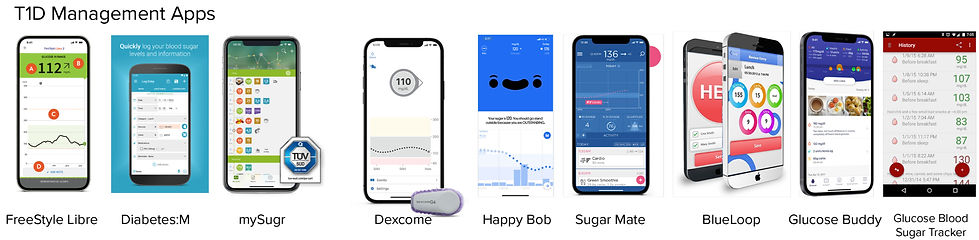
I analyzed 10 diabetes management apps and 5 mental health apps. Currently, there are no diabetes management apps on the market that address the mental health aspects of living with T1D; they all focus solely on the medical aspects. However, I identified features from each category that could be beneficial for my own design.

Mental Health Features
-
Current Glucose Reading
-
Glucose History
-
Trend Analysis
-
Notes for Food, Insulin, Exercise
-
Reports and Data Sharing
-
Alerts and Reminders
-
Customization
-
Medication Tracking
-
Nutritional Information Database
-
Educational Resources about Diabetes
-
Habit Formation Games
-
Bolus Calculator and reminder
Diabetes Features
-
Mood Tracking
-
Journaling
-
Inspirational Quotes
-
Reminders
-
Meditations
-
Exercises
-
Progress Tracking
-
Symptoms Tracking
User Personas

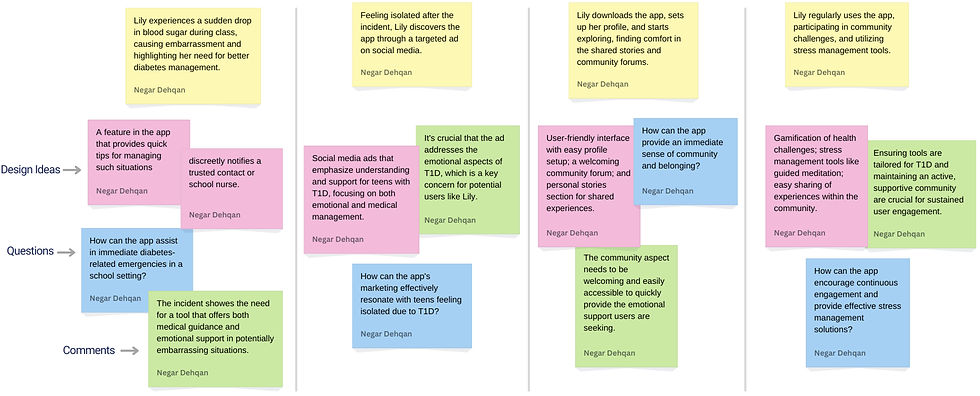
Scenario Mapping
_edited.jpg)
User Journey Map

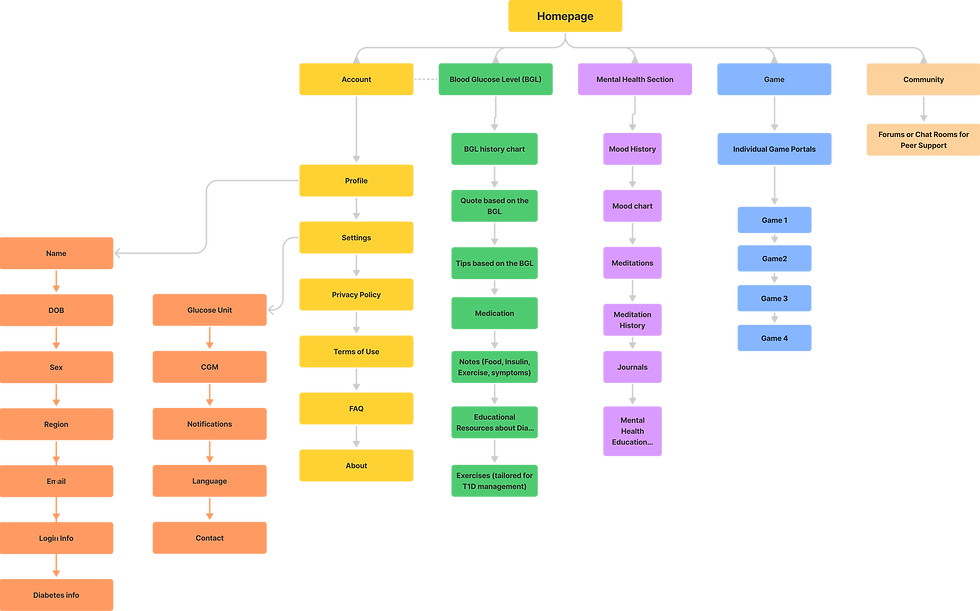
Information Architecture
.png)
Low-fi Wireframes

Final App Design
The brand’s voice is Fun, Calm, Colorful, Friendly, Relaxing, and Supportive. The friendly and calming tone of the brand helps to build a sense of trust and comfort among all users. Click here to see the branding process and other products of Glucomood. Click here for the interactive prototype.
Logo Motion and Onboarding Pages
The onboarding pages feature colorful backgrounds and illustrations paired with concise text to introduce users to the app environment and set their expectations.


Test Pages
The app administers a test to users to understand them better and personalize the app experience based on their answers and preferences.

Homepage
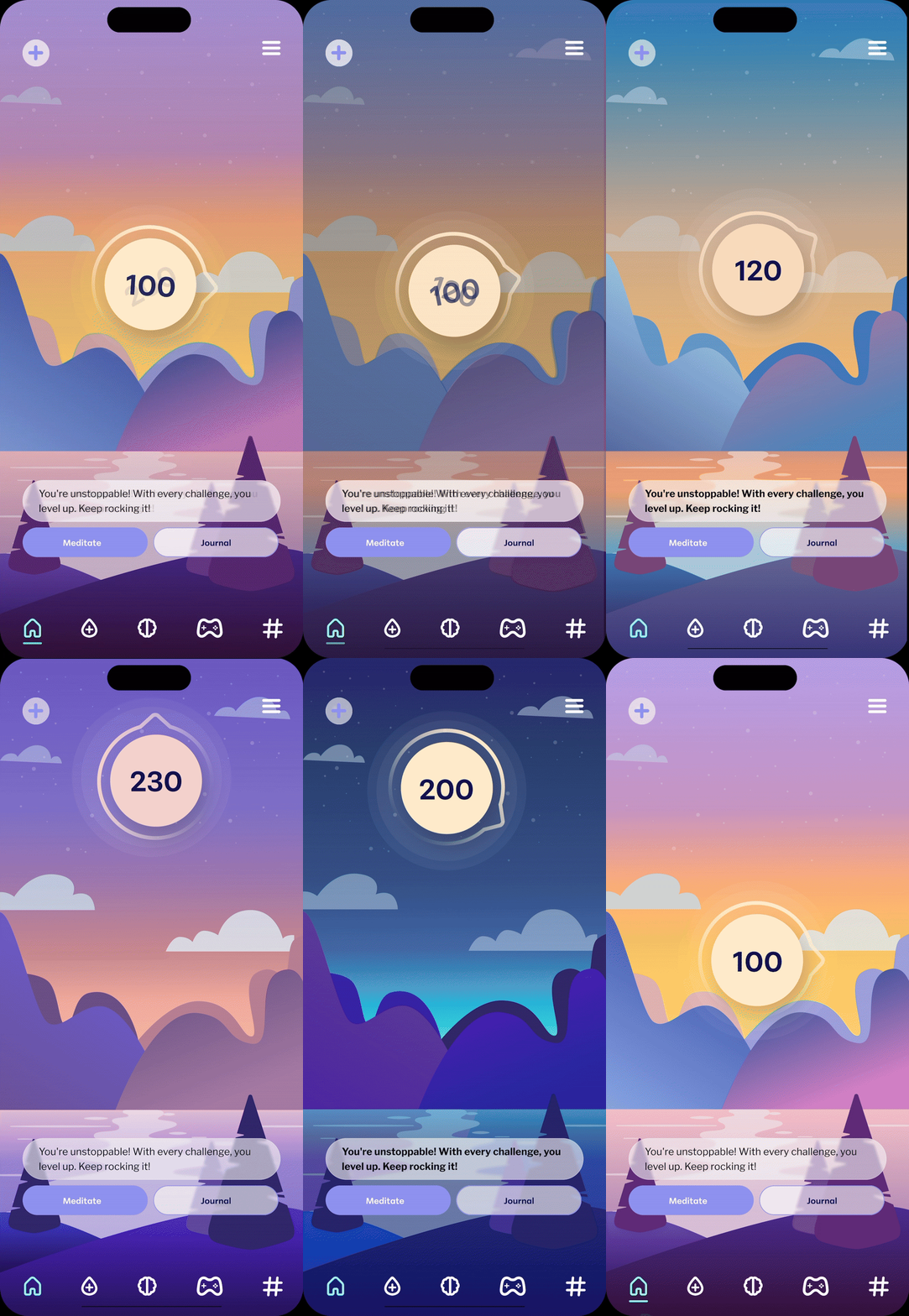

The homepage features a simple landscape background with minimal information to avoid overwhelming users at first glance. The landscape's color changes based on the time of day, and the position of the current glucose reading, resembling the sun or moon, moves up and down based on the number it is showing. This is beneficial for individuals with T1D as it helps them manage their medication, food, and insulin timing.
The button navigation menu includes five items: Home, Diabetes Management Page, Mental Health Page, Game, and Community. Additionally, there is a mood tracking option at the top left and a settings option at the top right of the page.
Mood Tracking
The mood tracking section allows users to select from five moods: angry, frustrated, neutral, happy, and ecstatic. Additionally, they can choose and customize other feelings based on their current emotions. The system records their glucose reading, time, and date, offering the option to later view correlations between glucose levels and moods.

Diabetes Managment Page

Current blood glucose level (BGL)
Diabetic workout recomendations
Glucose reading chart
Quote based on BGL
Feature to add carbs, insulin, activity, and health
Feature to calculate insulin based on carbs
Tips based on current BGL
Diabetic food recomendations
Mental Health Page

Meditation recommendation
Mood tracking chart
Mood tracking history
Journal history

Meditation Pages

Game and Community Pages

Smart Watch Design

User Testing
For user testing, I secured Institutional Review Board (IRB) approval from Penn State. Due to time constraints before my thesis defense, I was only able to conduct one usability testing session. During this session, the user was given a set of nine tasks to perform on the prototype. Based on their interactions, the following issues were identified.
Recomendations
-
Include text under each navigation menu icon.
-
Designing a different icon rather than the plus icon and include instructions when the user first installs the app.
-
Moving this feature to a more visible location on the page due to its importance.
-
The bottom navigation was hard to understand and navigate at first glance.
-
The mood tracking option was hard to locate by the user, especially from other pages.
-
The journaling feature was too far down and hard to find in the mental health page.
Findings
System Usability Scale (SUS)
The System Usability Scale (SUS) is a well-established 10-question survey administered at the end of a user test; it provides a measure of the perceived usability of the product and enables us to compare it with others. The average SUS score is 68. A score above this threshold indicates good usability, while a score above 80 signifies very good usability.
.png)
You may also like...
bottom of page